
Effective Alternatives to Inbox Zero
Take principled control of your email in the way that fits you best


You have my blessing to not achieve Inbox Zero.
You don’t have my blessing to have no process for your email at all.
Inbox Zero is a great ideal for many, but a daunting and unachievable goal for others. You’re not “bad at email” just because you don’t achieve Inbox Zero. You just haven’t found the best email approach for your preferences, priorities and personal ways of working.
Key Characteristics of Effective Email Processes
There are only a few features that your approach to email generally needs to have:
Trackability. You need to take care of emails that require your attention at an appropriate time and to not drop the ball on your colleagues’ expectations.
Selectivity. Some emails warrant a timely response. Some should just be read at some point this week. Many emails don’t require your attention at all; for the same reasons that you don’t say yes to everything, you don’t read every email.
Nonintrusiveness. You should be able to easily assess your incoming emails while minimizing real-time disruptions to your flow. Only urgent incoming emails should take more than a few seconds of your current focus.

How does your current approach score on each? Which matters most to you?
If you need a tune-up, try out some of the approaches I’ve seen work best in myself and others:
Classic Inbox Zero
In traditional Inbox Zero, through rigorous and frequent inbox triage sweeps, all new emails are continuously processed into quick replies, deferred to an appropriate later time, or summarily ignored, leaving no emails lingering in the inbox.
Objectively, this scores well on all three characteristics: It’s inherently selective in its triage decisions, tracks outstanding actions, and enables nonintrusive batching of work. It’s how I’ve managed all of my high-volume work inboxes and is worth a try for many people.
But if the stress of the zero target or of managing regular triage and review blocks is too intrusive to the way you work, you can succeed with less rigid approaches – particularly if you’re in an environment without a high volume of emails.
Deconstructing Inbox Zero
Through the lens of the three key characteristics, some assumptions of classic Inbox Zero can be relaxed.
Trackability can still be maintained with less frequent, bigger triage sweeps, though for many, this can take more time or create more stress than more constant sweeps. Selectivity matters most for urgent, important emails, so you do need to keep an eye on your inbox somehow even if you’re not doing deliberate triage passes. Nonintrusiveness can be subtly challenging with no structure; without a plan, it’s tempting to let your inbox pull your focus too often.
This relaxation of Inbox Zero gets close to the average person’s default, non-deliberate approach to email: look at your inbox often enough to see and respond to urgent emails – but not more often than that – and try to get to your important emails before too long.
If the tradeoffs are worth it and the risks mitigated, this “deconstructed” approach can be a sufficient and accessible baseline for some, particularly for lower-volume inboxes. That baseline can be further experimented upon using the following examples.
Starring / Favoriting
For email trackability and selectivity, a little bit of organization goes a long way.
As you first see the most important emails that require your followup, try adding stars to (favoriting) them. This takes just a few seconds and is easy to do from a mobile device in a minimally intrusive way, such as while hustling between meetings or catching up on your inbox over lunch.
Then incorporate a brief review of your Starred emails regularly to serve as a backstop to you losing track of them. If you forget about an email that you didn’t star, you know it’s not a big deal.
Drafts and Scheduled as To-Do Lists
Triage non-urgent emails that need your action by starting a draft (by Forwarding, not Replying, to prevent accidental sends) with a short note to yourself about what you need to do next. Then, regularly review your entire Drafts folder every day or so.
These drafts help set your intention for your next move and capture your current context for your future reference while allowing you to move on to the next thing for now. You can also set up reminders for the most important deadlines – simply schedule the draft to send itself to you at the time when you must turn your focus to this.
Triage to Folders or Labels
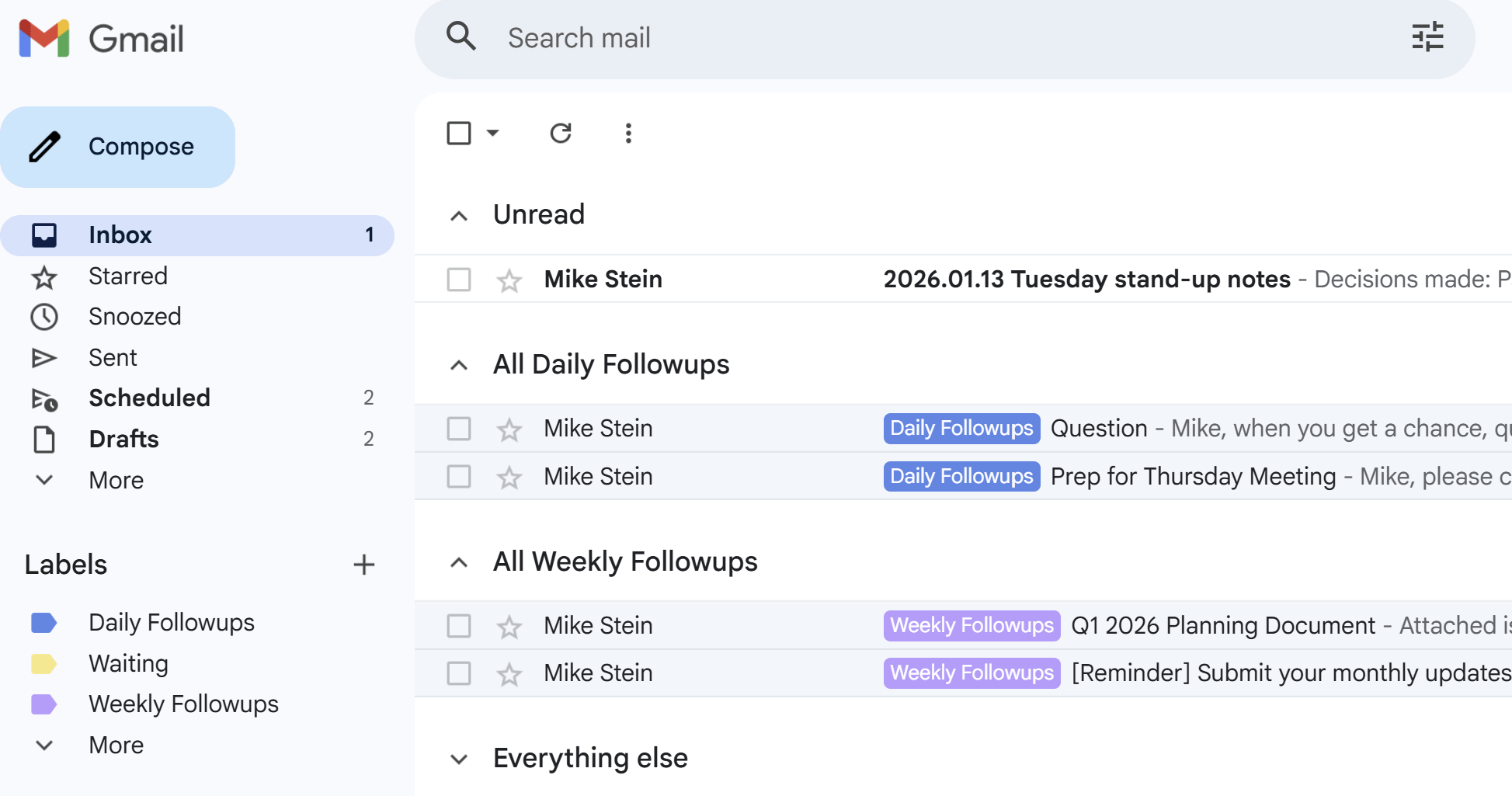
Sorting emails into a small set of folders (or labels, in Gmail) can strike a good balance of nonintrusively enabling you to track and be selective in your inbox. Here’s the simple folder structure I’ve used to manage most of my inboxes:
Daily Followups – For emails that require your reply or action soon, but not now. Review and action daily at the time that fits your schedule best. You don’t have to empty it every day, but it’s useful to reassess your priorities every day.
Weekly Followups – For longer-term reading or lower-priority actions.
Waiting – For emails with actions others need to take for you. Tip: you can move your own Sent emails here. Review every week or so.
Reverse Inbox Zero, and beyond
One of my colleagues practiced what they called “Reverse Inbox Zero”: they got almost all of their emails, including those to large group mailing lists, into a single inbox folder and browsed them by subject without full triage. And they were always responsive to my important emails!
The risks here are clear around trackability and selectivity, but it’s certainly maximally nonintrusive. I wouldn’t recommend it for most people. But it worked for them because they knew how they valued these tradeoffs and were deliberate in setting up a plan.
Put it into Practice
The only wrong answer is having no process at all.
So: what’s the approach to your inbox that works best for you?
Need a hand designing a method that’s fully optimized to you and your team? Contact me for a free consultation on my Productivity Masterclass workshop and 1:1 coaching.