
Time Blocking: Pros, Cons and Mitigations
When and how recurring calendar holds help measure and prioritize routine tasks

Last week, we explored how to assess your marginal time budget to understand and utilize the true cost of prospective new pulls on your time:

One way to calibrate your time budget and convey it to others is through time blocking: using recurring calendar blocks for routine tasks to account for and batch your use of your time. Today, we’ll take a deeper look at how to try time blocking, its upsides, downsides and mitigations.
When and How to Use Time Blocking
Throughout my career, I’ve used time blocking during my busier stretches, but I mostly don’t. I’ve found that time blocking helps the most when you have:
A high total volume of work
Different types of work that happen routinely, at about the same volume per week
Colleagues who benefit from understanding your time and availability
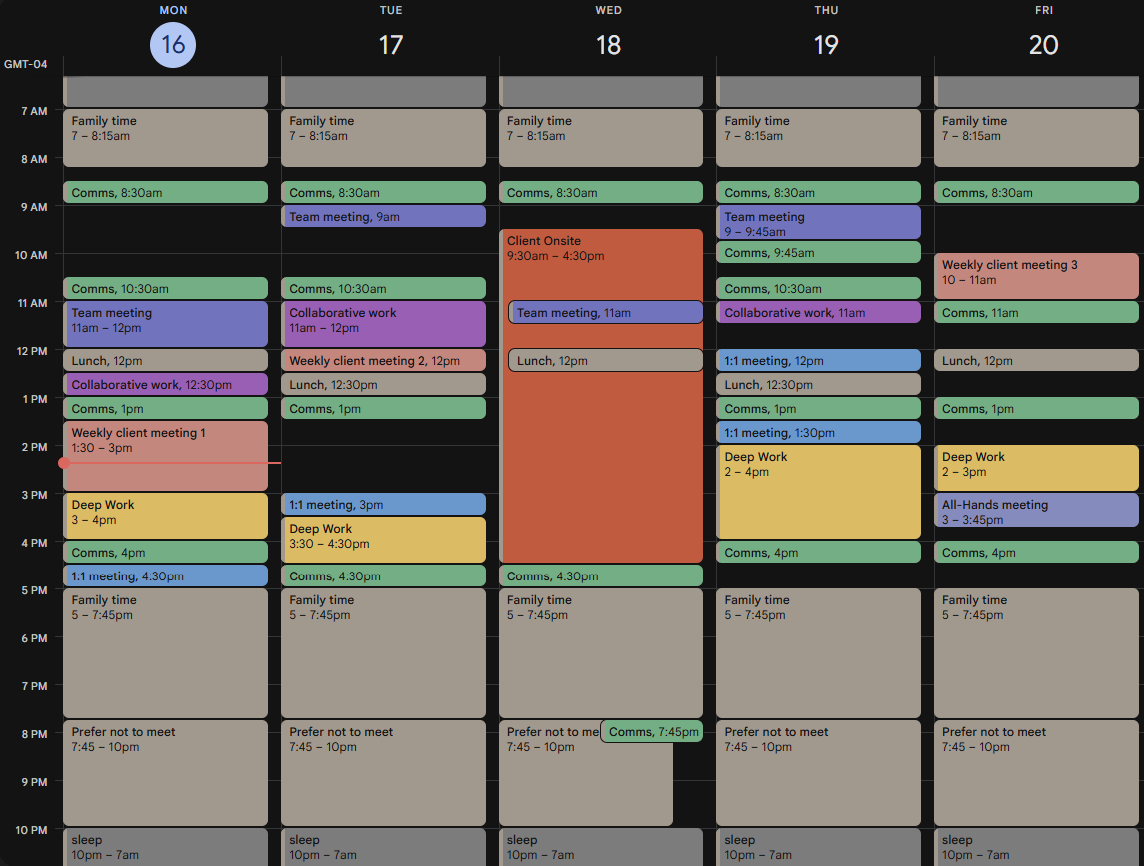
I first tried time blocking when I was on several teams simultaneously, each with varying types of meetings and some with long client engagements. My default week, after time blocking, looked like the image above.
The main additions to my calendar from time blocking were two total hours per day of communications (reading and responding to email and Slack) in green, and one continuous hour per day of focused deep work in yellow.
Picking even a single routine but unaccounted for piece of your day – communications is a great fit – and trying out fitting that work into a few blocks in your day will bring many benefits:
Pros of Time Blocking
Honest accounting to yourself and others – If you aren’t sure how long you spend on a routine activity, time blocking is the fastest way to calibrate yourself to the true time cost of e.g. your daily communications. You’ll also have less misleadingly blank space on your calendar and a better view of your remaining marginal time.
Habit-building – If you can’t or shouldn’t go through half of your day without sweeping your email at least once, the reminders on your calendar can help remind you to leave ample time to do so at the right parts of your day – and try to avoid scheduling meetings that disrupt this. This will help prevent you from getting deeply behind on any type of routine work you’ve assessed as important.
Clarity on what can be displaced – A color-coded calendar can help you see the relative importance of your plan for a day and how different blocks can be appropriately displaced in favor of higher-priority work. For example, on my calendar, the weekly red Client Onsite block was the most important, so it led me to reschedule some of my green Comms and yellow Deep Work blocks appropriately, some to that evening and others by extending the time the next day to catch up.
Cons of Time Blocking, and Mitigations
Other than the slight setup cost of finding the right recurring times on your calendar, the main cons of time blocking are around loss of flexibility of your time and calendar, but these can be mitigated:
Your colleagues may struggle to find times for important group meetings on your calendar when you’d actually be willing to accommodate them.
Mitigation: Convey that your lower-priority daily blocks can be rescheduled or cancelled by (if you use an Outlook calendar) marking them as Tentative and/or adding an ↔️ to the front of its title to show that it can be moved within the day. Talk to your team to set these expectations – it’s worth a little extra effort and can help keep your meeting budget balanced.
You might adhere to your calendar too much and underinvest your time in important emerging work.
Mitigation: Treat all of your routine daily time blocks as medium-to-low priority and maintain an active willingness to abandon them for high-priority work. Check in with yourself at the end of each week to reflect on if you missed an important pivot. If you did, try shortening your time blocks and limiting your blocked time to higher-priority work.
The amount of time you need to spend per day or week on routine tasks may vary.
Mitigation: Spend a minute at the end of each week adjusting the default blocks on next week’s calendar. If you’re on work travel and there’s an expectation of you being less available for routine communications, cancel some of the blocks. If you don’t have a major project that requires deep work this week, shorten your blocked time. It’s usually still better to start from a slightly inaccurate starting point than to start from zero.
This all gets tougher to manage the busier you get.
Mitigation: True, but understanding and prioritizing your time also gets more important the busier you get. Keep an eye on when time blocking may not be the best solution and try other approaches.
Alternatively, if you already struggle with keeping an eye on your calendar or frequently find yourself in long flow states, you run the risk of time blocking being useless. A good mitigation here is to set reminders for the time-blocked events on your calendar, not to necessarily always pull your focus from deep work, but to surface the opportunity to consider it, either now or catching up later.
Put it into Practice
Start small. Pick one part of your day that you know you have to do but don’t currently measure or hold yourself accountable for – perhaps just a single mode of communication, such as Slack, or something even slower-scale, such as trying to fit in at least one lunch per week not taken at your desk. Decide how much time per day/week you believe you should spend on it, set up the blocks, and iterate.
Give up after one week if the juice isn’t feeling worth the squeeze. Even a single week of experimenting with time blocking is enough to calibrate you to how much time you’re spending on an activity, and that’s valuable information even if you don’t continue the practice.